
Why regular system and software updates matter for security
Postponed updates are one of the most common and most easily avoidable security risks. What needs updating and how to do it without disrupting the business.
Vibika

Many employees postpone the “an update is available” notification until later, and then later still. On servers and network equipment the situation is often even worse: the device works, nobody wants to touch it, and so months or years pass without a single fix. From a security standpoint, this is one of the most common and most easily avoidable risks.
What updates actually do
Software updates do not just bring new features. The most important part are the security fixes (patches) for vulnerabilities discovered by vendors, researchers or, unfortunately, attackers. The American agency CISA sums it up simply: updates “patch” the vulnerabilities criminals exploit, but they can only protect you if they are installed.
When a vendor publishes a patch, the description of the problem becomes public. From that moment attackers know what to look for, so systems that have not been updated become an easier target than before the disclosure.
Vulnerabilities that are actually exploited
CISA maintains the Known Exploited Vulnerabilities (KEV) catalog, a public list of vulnerabilities with evidence of exploitation in real attacks. Products used by small companies appear in the catalog regularly: operating systems, browsers, VPN devices, routers, firewalls and NAS systems. It is a good reminder that attackers do not target only large companies, but any system that is reachable from the internet and unpatched.
In its #StopRansomware guide, CISA recommends giving priority to timely updates of internet-facing systems and to vulnerabilities known to be exploited.
End of support is a special kind of risk
Every piece of software has a life cycle. When the vendor stops supporting it, the security fixes stop too, even if the system still “works fine”. Windows 10 is an example: according to Microsoft’s documentation, support for the Home and Pro editions ended on 14 October 2025. A computer running that system without an additional extended-support programme no longer receives regular security fixes.
The same applies to old versions of server systems, network equipment firmware and web platforms. That is why it pays to know which devices and programs in the company are approaching end of support and to plan replacements in good time, not at the moment of a failure or an incident.
What needs updating
When people say “updates”, they usually mean Windows. In reality, the list is longer:
-
operating systems on computers and servers (Windows, Linux);
-
browsers and commonly used programs (office suites, PDF readers);
-
network equipment firmware – routers, switches, access points, firewalls (e.g. MikroTik RouterOS, UniFi);
-
NAS devices and their applications;
-
VoIP phones and PBXs, cameras and printers;
-
websites and web applications, together with the libraries and components they use;
-
containers and server services, e.g. Docker images built on old base images.
How to update without disrupting the business
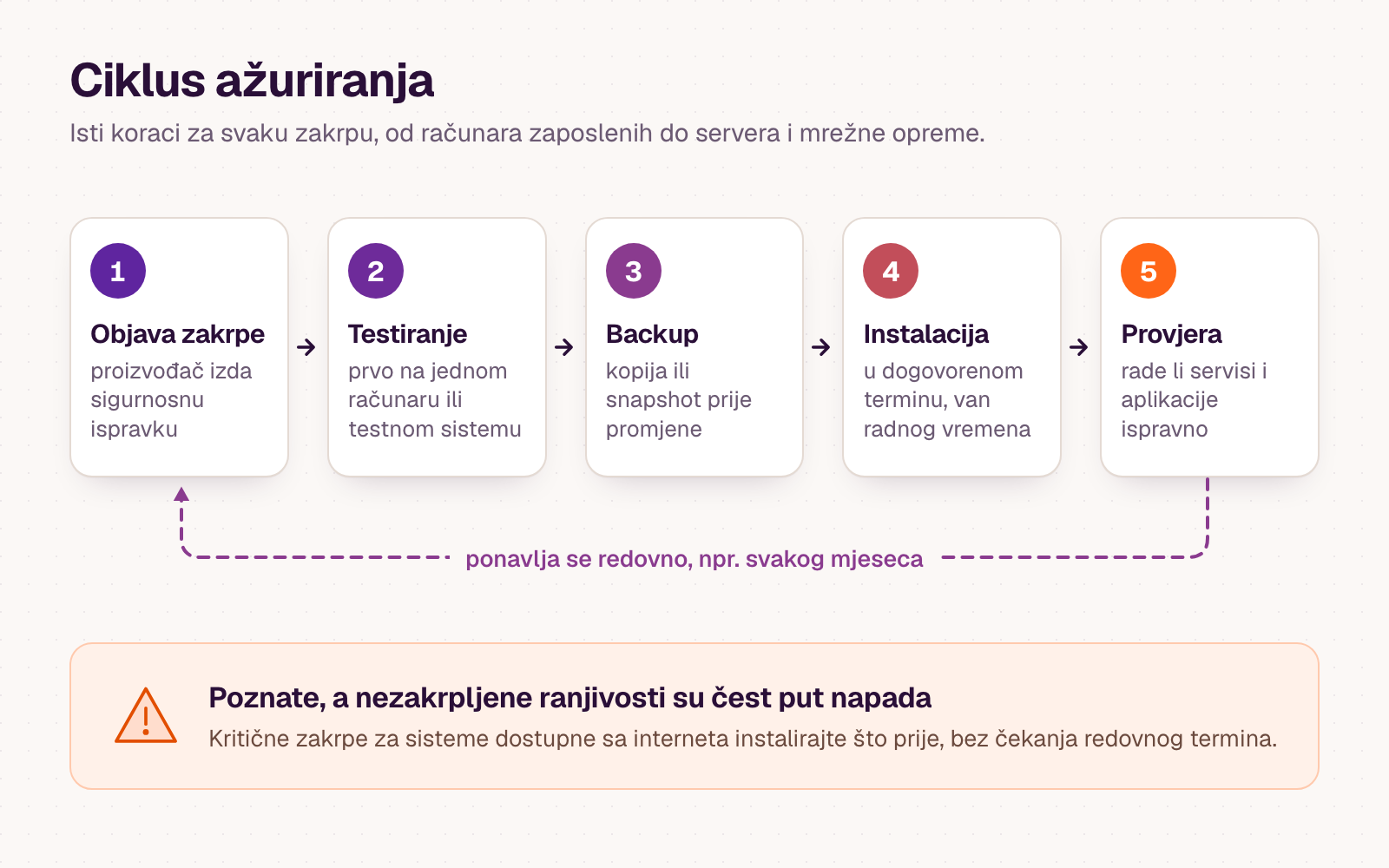
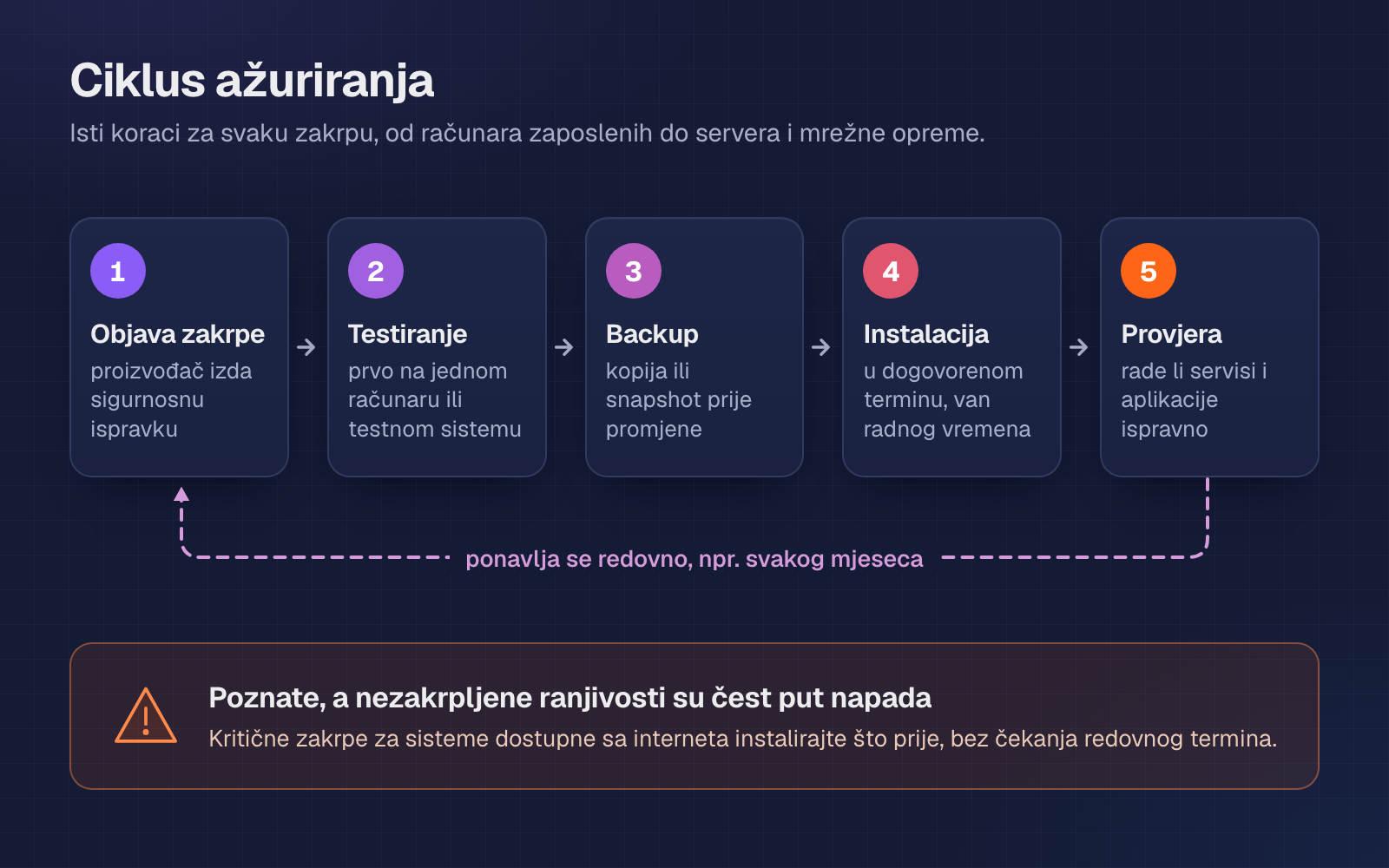
The usual reason updates get postponed is the fear that something will stop working. That risk exists, but it can be managed:
For employees’ computers
-
switch on automatic updates, as CISA also advises;
-
schedule installation and restarts outside working hours;
-
verify that all computers are actually receiving fixes, rather than assuming they are.
For servers and network equipment
-
know when vendors publish fixes: Microsoft, for example, releases regular Windows security updates on the second Tuesday of the month;
-
make a backup or a snapshot before updating, especially for virtual machines and network equipment configurations;
-
update in an agreed window, when a short interruption hurts the least;
-
install critical fixes for internet-facing systems as soon as possible, without waiting for the regular window;
-
after updating, check that the services are running correctly.
For websites and applications
-
update libraries and dependencies regularly;
-
verify changes in a test environment first;
-
follow security advisories for the components in use.
Install only from official sources
Attackers sometimes send fake “urgent updates” by e-mail or through pop-ups on websites. CISA recommends downloading updates exclusively through the device’s own settings or from the vendor’s official site. A link in an unexpected message is not the right place to download software.
Checklist
-
There is an inventory of computers, servers and network equipment with software versions.
-
Automatic updates are switched on for the computers.
-
Servers and network equipment are updated in regular, agreed windows.
-
A backup or snapshot is made before larger updates.
-
Internet-facing systems take priority.
-
It is known which systems are close to end of support, and there is a replacement plan.
-
Updates are downloaded only from official sources.
How we can help
Regular server maintenance, planned updates and system monitoring are part of our system and server administration service, while updating and configuring network equipment is part of network administration. Send us an inquiry if you would like us to put together a maintenance plan with you.