

A custom-built website: what matters for speed and SEO
What the Core Web Vitals are (LCP, INP, CLS), what they have to do with Google search, and what affects website speed the most.
Vibika

For many companies, the website is the first contact with a future client. If it loads slowly, if the content shifts while the user is trying to click, or if a button responds with a delay, the visitor gives up easily and goes back to the search results. That is why Google has been measuring exactly these experiences for years and writes about them openly in its documentation.
What the Core Web Vitals are
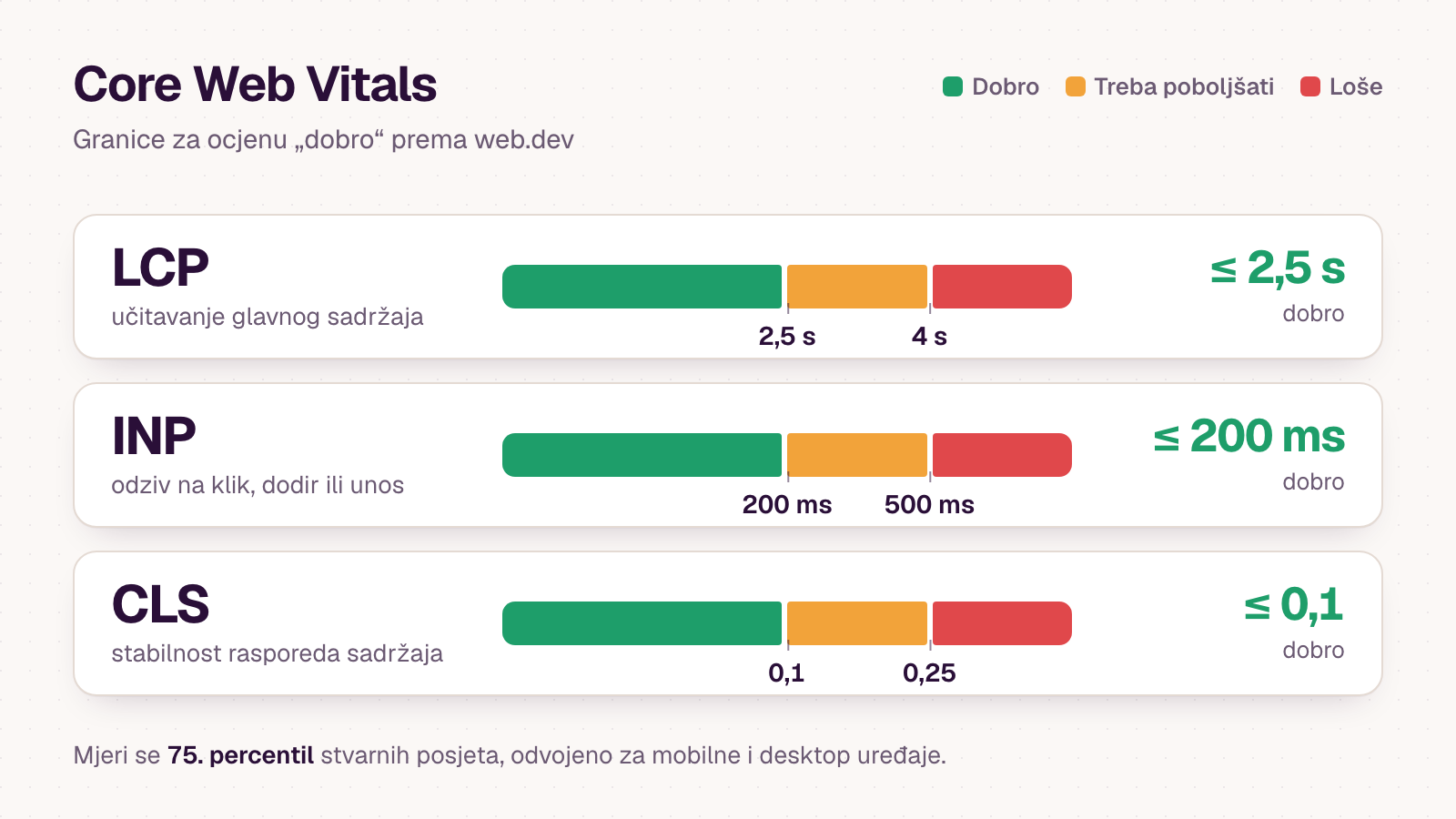
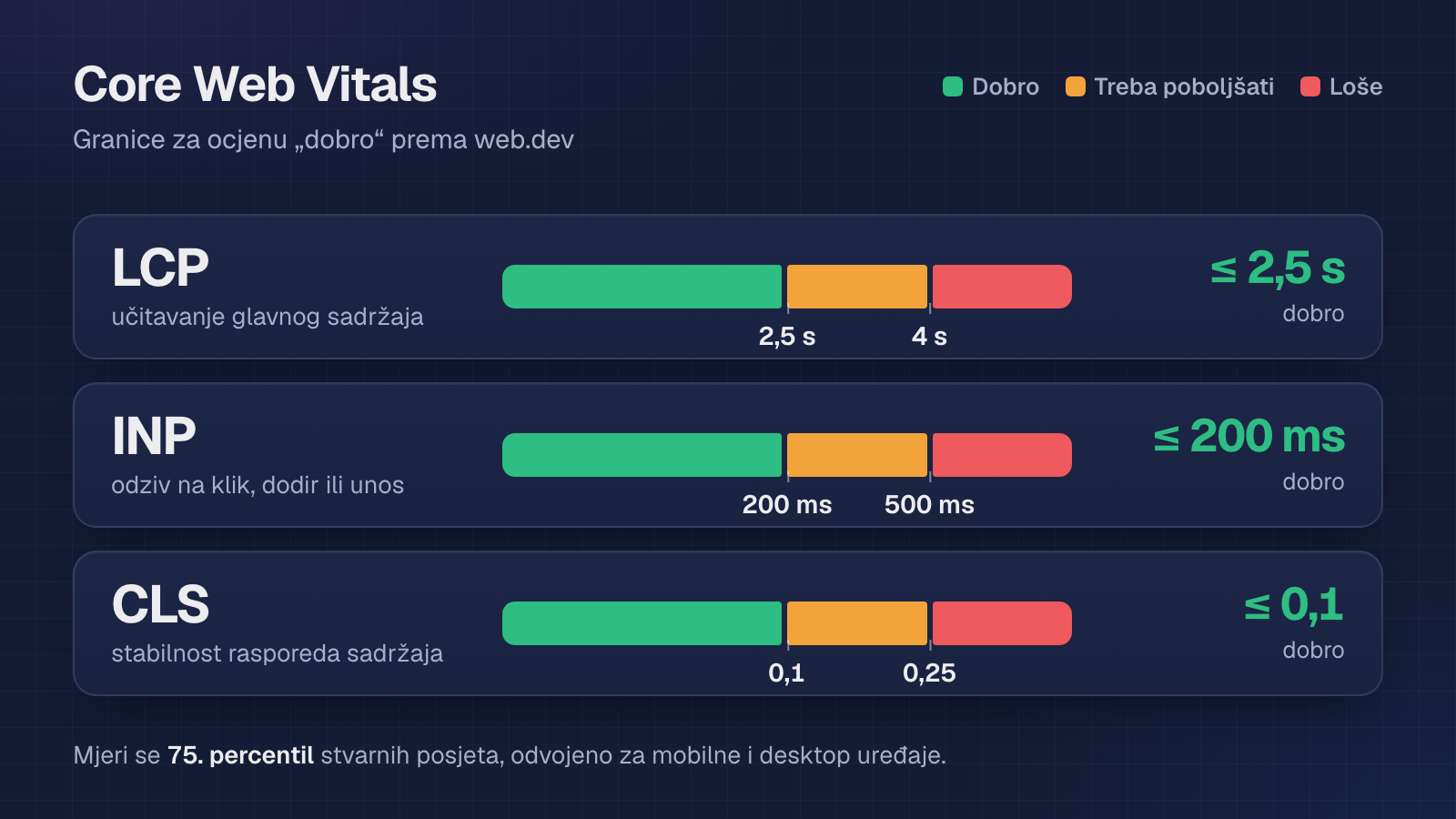
The Core Web Vitals are three metrics that describe the real user experience on a page. According to the web.dev documentation, good values are:
| Metric | What it measures | Good value |
|---|---|---|
| LCP (Largest Contentful Paint) | how quickly the largest visible content appears, e.g. the main image or heading | up to 2.5 seconds |
| INP (Interaction to Next Paint) | how quickly the page responds to a click, tap or input | up to 200 milliseconds |
| CLS (Cumulative Layout Shift) | how much the content shifts unexpectedly during loading | up to 0.1 |
How these values are assessed matters: Google recommends looking at the 75th percentile of visits, separately for mobile and desktop devices. This means it is not enough for the site to be fast on a developer’s computer with a fast connection — it has to be good for the large majority of real visitors.
In March 2024, INP replaced the earlier FID metric, because it describes the page’s responsiveness throughout the whole visit, not just at the first interaction.
What this has to do with SEO
In its Search documentation, Google states that the Core Web Vitals match what its core ranking systems seek to reward, and recommends good values both for success in search and for the user experience in general. At the same time, Google notes that search always tries to show the most relevant content, even when the page experience is not the best — but that for searches where there is a lot of useful content, a good experience can contribute to success. In other words, speed cannot make up for poor content, but it can make the difference between similar pages.
There is also mobile-first indexing: Google uses the mobile version of a page’s content for indexing and ranking. If the site is slow on a phone, hard to read, or has less content than on desktop, that shows up in search as well.
Why a custom build is an advantage
With sites assembled from ready-made templates and a large number of plugins, a common problem is code loaded “just in case”: scripts, styles and fonts the page never uses. When a site is built from scratch, what gets loaded, in what order and in what form can be planned from the start. That does not guarantee good results by itself, but it gives full control over the factors that drive them.
What affects speed the most
Images
Images are very often the largest element on a page, so they directly affect LCP. Good practice is to:
-
use modern formats (e.g. WebP or AVIF) and dimensions matched to the display;
-
serve several sizes of the same image for different screens;
-
not lazy-load the main image at the top of the page, while lazy-loading the images further down.
Fonts and scripts
-
limit the number of fonts and variants;
-
avoid scripts that block the page from rendering;
-
choose third-party tools (chat, analytics, maps) carefully, because each one adds weight and can worsen INP.
A stable layout (CLS)
-
reserve space in advance for images, videos and ad blocks;
-
do not insert content above what the user is already reading (e.g. banners that appear later).
Server and caching
-
fast server response and caching of static files;
-
content compression and delivery over HTTPS;
-
regular maintenance and availability monitoring.
Technical SEO fundamentals
Besides speed, search engines need to be able to understand the page easily:
-
a clear heading structure (one H1, then H2 and H3);
-
unique page titles and meta descriptions;
-
readable URLs and correct internal links;
-
a sitemap and correct indexing settings;
-
alternative text on images, which also helps accessibility.
How to measure where you stand
There is no need to guess. Google offers free tools:
-
PageSpeed Insights shows both lab measurements and real-user data, when there is enough of it;
-
Search Console has a Core Web Vitals report for the whole site, grouped by type of problem;
-
the browser’s developer tools (Lighthouse) help find the specific cause.
Checklist
-
LCP, INP and CLS are in the “good” range for mobile and desktop visits.
-
Images are optimised and sized for the screen.
-
There are no unnecessary scripts or third-party add-ons.
-
The content does not shift while loading.
-
The mobile version has the same important content as the desktop version.
-
Every page has a unique title and meta description.
-
The site is registered in Search Console and checked from time to time.
How we can help
We build websites from scratch, with attention to speed, mobile display and technical SEO. Read more on the Website development page, and for an assessment of your project send us an inquiry.